Temporary email: is it really safe for your data?
Need to sign up for a tool you'll only use once? A temporary email looks like the perfect shortcut: no account, no password, no real address given away. But is it really safe for your data? I tried it, and the answer is less simple than it seems.

September is back-to-school month, when kids proudly show off their new schoolbags and reunite with their classmates. For the reader that I am, September is also, and above all, the rentrée littéraire, France’s big autumn book season, when hundreds of new novels hit the shelves at once.
And of course, this year’s rentrée littéraire came with its own controversy: the Thélyson Orélien affair. His novel C’était ça ou mourir (which I haven’t read yet) was allegedly written by AI, according to the AI detection software Pangram. The author denies it.
My curiosity piqued, I wanted to take a closer look at how this famous tool works, like many others, I suspect. But then, surprise (not really): the tool isn’t freely accessible. You have to create an account. In other words, hand over your email address. In other words, hand over a piece of personal data.
After this summer’s staggering data leaks in France (which we discussed in our previous article), I had no desire to give my real address to yet another service I’d only use once. So it was the perfect opportunity to try something I’d heard about around the internet: temporary email.
What is a temporary email?
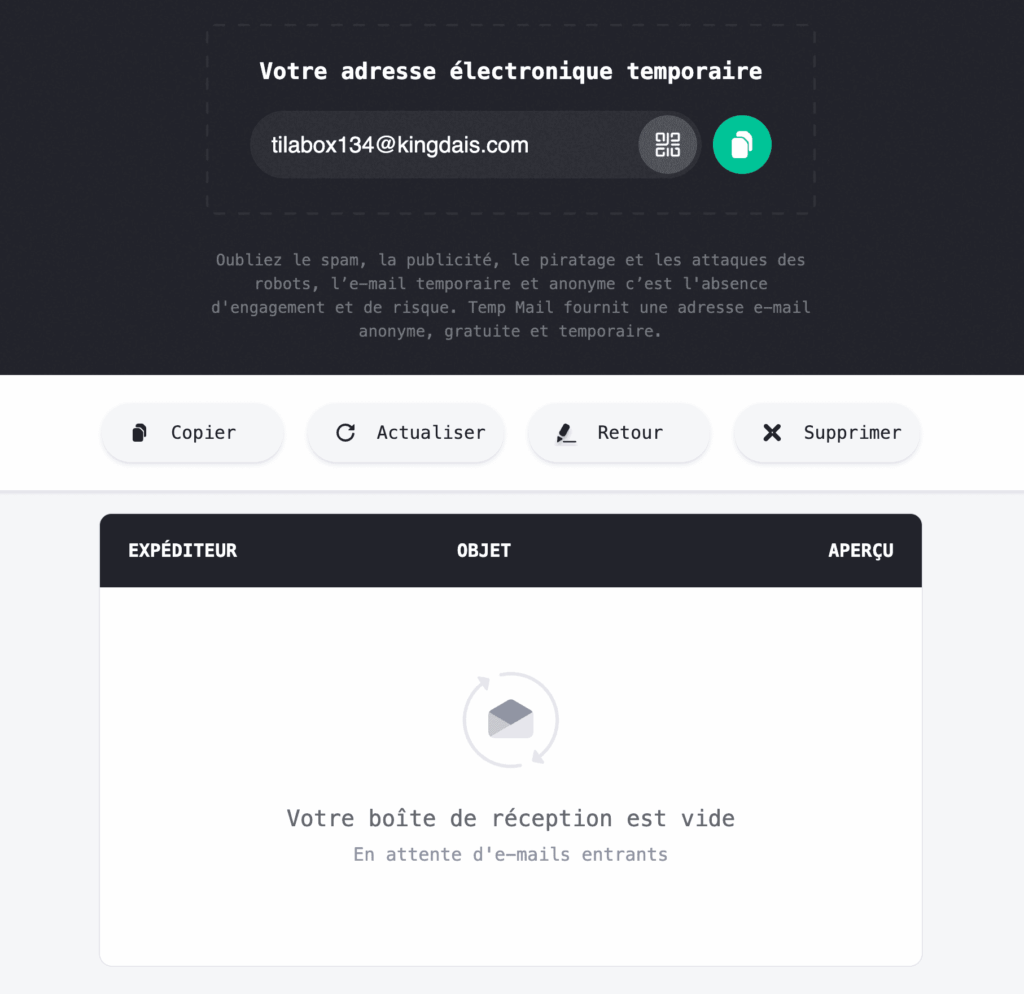
Temporary (or “disposable”) emails are public mailboxes. The service owns domain names set up to accept all incoming mail, at any address. Messages appear directly on a website, then get deleted after a few minutes or a few hours. No account, no password: you open the page, and an address is waiting for you. That’s what makes them so “convenient”.
But is it really safe for your data?
Short answer: no. But that’s to be expected. A public mailbox doesn’t belong to you, and since it’s public, anyone can access it. On many of these services, all it takes is typing in the address to read what’s inside. No need to be a hacker or a computer genius: you just need to get hold of the name, or guess it.
So you might wonder: “Maybe it’s a bug?” No, again. Most free temporary email services are built this way, and some even say so in black and white in their terms of use. Everything you receive there can be read by other users and should be considered public. Here, simplicity is the product: no sign-up, instant access. But that simplicity comes at a cost, and it can become very dangerous for anyone who uses it carelessly.
A concrete example: you create an account on a website with a burner email address. A few days later, someone types that same address into the temporary email site, clicks “forgot password” on the website in question… and receives the reset link in the public inbox. Your account is now theirs. Same goes for verification codes: they stay visible for as long as the inbox exists.
Or the opposite happens: the inbox expires, you forget your password, and there’s no way left to recover your account. The door has shut and the key is gone with it, leaving you just a little crestfallen.
So when should you use a temporary email?
Good question. Now that you know the content of these inboxes is open to everyone, you’ll rethink how you use them. The right question to ask yourself: “If a stranger read this email, would it bother me, or expose me to financial, administrative or identity-related risks?” And a second one: “Will I ever come back to this site?”
With those two questions in mind every time, here’s when it comes in “handy”:
- trying out a tool out of curiosity, like I did, when you know you won’t be back;
- downloading a white paper, a PDF or a discount code “free in exchange for your email”;
- accessing public wifi that asks for an email address you’d rather not give;
- entering a contest or signing up for a newsletter you just want to flip through once.
It’s out of the question for:
- anything related to banking, health, government services or taxes;
- any purchase (invoices, order tracking, refunds);
- any account you’ll want to keep, even for a little while;
- anything that sends you login details, passwords or links to personal data.
A few precautions if you use one
- Keep in mind that it’s a disposable tool: it should contain no personal or easily traceable information.
- One address, one use. Don’t reuse the same temp mail address for several sites.
- Choose a long, random address rather than something too easy to identify.
- Copy what you need right away. In an hour (or less, depending on the tool), everything will be gone.
- Don’t let your guard down. An email received in a disposable inbox can be phishing like any other: don’t click on just anything.
- Disposable doesn’t mean anonymous. Ordinary people haven’t been anonymous online for a long time, and the sites you sign up for can still see your IP address, your browser and your behavior. A temporary email protects your inbox, not your identity.
- Don’t be surprised if you get turned away. More and more websites block known disposable email domains.
The alternative: email aliases
Of course, there are alternatives to these temporary mailboxes, such as aliases. Instead of a public mailbox, you get a PO box. You create a different address for each site (for example one for Pangram, one for your online bookshop, one for a reading app). Each one forwards messages to your real inbox, without the sender ever knowing your actual address.
The advantages are many:
- No one else reads your emails. The alias is tied to a protected account, not displayed on a public page.
- You can turn off the tap. Too much spam? You deactivate the alias in one click, and your real address stays untouched.
- You know who sold your data or suffered a security breach. If you get ads on the alias created for a specific site, you know exactly who sold or leaked your data.
- You can recover your accounts. Unlike a disposable inbox, an alias exists until you delete it.
One honest caveat, though: the alias service itself knows the link between your aliases and your real address, since it’s the one forwarding your mail. So everything comes down to how much you trust it. Hence the importance of choosing it carefully.
So in the end, this autumn’s literary saga taught us an unexpected little lesson: our curiosity shouldn’t be paid for with our data. So before filling in the next form, let’s ask ourselves whether this site really needs our real address. Most of the time, you know the answer is no.
Cover credit : Photo by Philip Oroni on Unsplash